TwoCum Payments and Pricing

Woman using TwoCum while laying in bed

100% SAFE AND SECURE ADULT PAYMENTS.

TwoCum Payments and Pricing

Interested in giving TwoCum a go, but unsure how it’ll affect your wallet? You’re in exactly the right place. TwoCum payments and TwoCum pricing are built around a simple pay-per-minute model. Instead of having to sign up for a subscription or agree to recurring charges after login, you buy minutes on TwoCum and use them for private 1-on-1 cam chats. Minutes are deducted only while you are using the platform, so the cost depends on how long you choose to stay connected.

There are absolutely no subscriptions or recurring charges involved, allowing you to manage your balance with total clarity. Here is a comprehensive look at how transactions work. 

Understanding How TwoCum Pricing Works

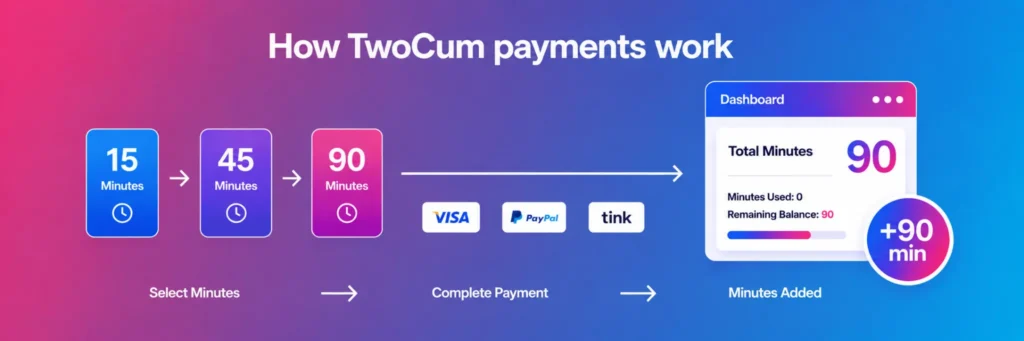
Steps of payments and pricing packages of TwoCum

When you buy minutes on TwoCum, you’re purchasing chat time directly with no bundle packages or any complex tiered plans. The system is as transparent as it gets:

  • Minutes are deducted in real time during an active chat session
  • When a session ends, the clock stops
  • Unused minutes stay in your account; they don’t expire between sessions
  • There are no automatic renewals or surprise charges at the end of the month

This model puts you in full control of your spending. You decide when to buy, how many minutes to get, and when to use them. TwoCum never charges your payment method without your explicit action.

Worth knowing: TwoCum has over 1 million registered users from more than 100 countries, and all their cam interactions go through the same simple pay-per-minute system described here.

Does TwoCum Use a Subscription Model?

No, and this is one of the most common questions new users have.

TwoCum does not use a subscription model of any kind. There are no recurring payments, no monthly membership fees, and no automatic billing cycles. Your payment method is only charged when you actively choose to purchase minutes.

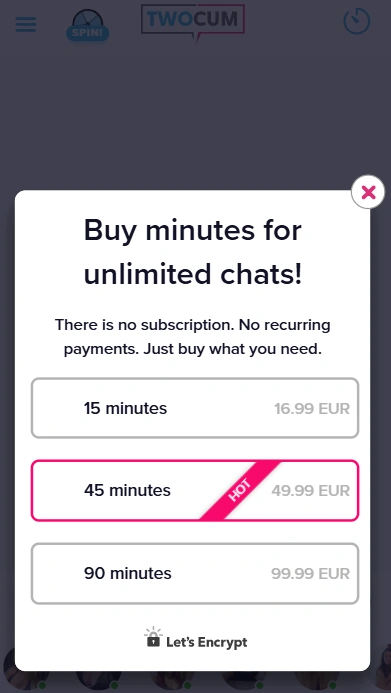
Pricing of minute packages on TwoCum

The difference is straightforward:

Subscription TwoCum (Pay-Per-Minute)
Billing cycle Automatic, recurring On-demand only
Minimum commitment Monthly or annual None
Unused time Often lost Minutes stay in your account

A TwoCum subscription simply doesn’t exist. You buy minutes when you want them, use them at your own pace, and nothing is ever charged without you initiating it.

Payment Options Available on TwoCum

TwoCum accepts several widely-used payment methods so you can choose the option that works best for you. All transactions are processed through encrypted, third-party payment providers. TwoCum itself never stores your full card or bank details. 

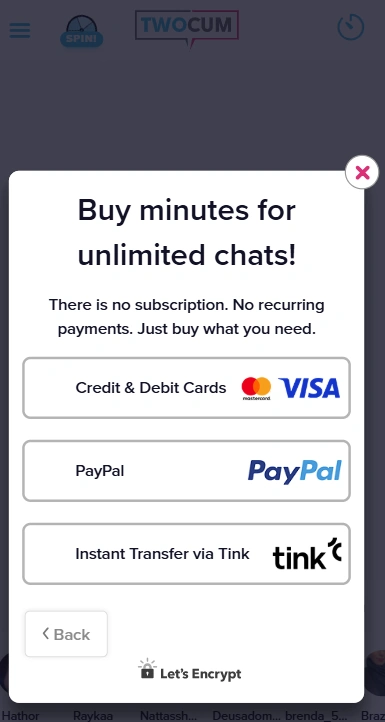
Minutes methods of TwoCum

Paying with Credit or Debit Cards

TwoCum credit card payment is supported for all major card types, including Visa, Mastercard, and similar networks. This is the most common payment method on the platform. The checkout process is straightforward: enter your card details, confirm the amount, and your minutes are credited instantly.

Using PayPal for Payments

TwoCum PayPal payments offer an additional layer of separation between your bank account and the platform. If you prefer not to enter card details directly, PayPal is a solid alternative. You’ll be redirected to PayPal’s secure login during checkout, and once confirmed, minutes are added to your account right away.

Instant Bank Transfer Through Tink

For users who prefer direct bank transfers, TwoCum supports instant transfer via Tink, a licensed, regulated open banking provider. Tink connects directly to your bank to initiate a transfer without requiring you to enter card information. It’s a fast, secure option that’s increasingly popular across Europe.

Promotional Offers and Bonus Minutes

Special offers and bonus deals users find on TwoCum

During the checkout process, TwoCum special offers may appear, typically in the form of bonus minutes or enhanced packages on certain purchase amounts. These offers can vary depending on the time and your account status, and they’re always shown before you complete payment, so you can decide whether to take advantage of them.

A few things worth knowing about these offers:

  • They are optional and are never applied automatically
  • Availability is not guaranteed and may change at any time
  • The standard per-minute rate always applies if no offer is shown
  • Offers are displayed transparently at the checkout stage

TwoCum will never process a promotional charge you haven’t explicitly confirmed.

Payment Security and Transaction Protection on TwoCum

Every payment on TwoCum is processed through established, third-party payment providers. It’s the same type of infrastructure used across reputable online platforms globally. This means your card or bank data is handled according to industry-standard security practices, not stored locally on TwoCum’s servers.

Key points on payment security:

  • Encrypted checkout: Payment pages use standard SSL/TLS encryption to protect data in transit
  • Trusted providers: All transactions are processed by licensed payment processors (including PayPal and Tink)
  • Age verification: All TwoCum users undergo a mandatory ID-based age verification at registration. This adds an extra layer of account legitimacy and platform integrity

Over 1 million verified users across 100+ countries transact on TwoCum using the same secure payment infrastructure described here.

Ready to Get Started on TwoCum?

The financial structure of the platform is built entirely around clarity, transparency, and user autonomy. By completely eliminating ongoing billing cycles and automatic renewals, you are free to navigate your account strictly on your own terms.

With a secure infrastructure that prioritizes safety for a global community of over 1 million users, you can manage your balance with total peace of mind.

Ready to start? Create your TwoCum account, complete the age verification process, and check the current minute options available at checkout.

Woman using TwoCum while laying in bed

100% SAFE AND SECURE ADULT PAYMENTS.

FAQ about the TwoCum Payments and Pricing

TwoCum charges per minute of chat time. The exact rate per minute is shown at checkout before you commit to a purchase. There are no membership fees or minimum spend requirements; you simply buy the minutes you want and use them when you’re ready.

No. TwoCum does not offer or require any subscription. There are no monthly plans, no recurring billing, and nothing to cancel. You purchase minutes on demand and your payment method is only charged when you initiate a transaction.

There are no recurring or automatic payments of any kind. Every TwoCum transaction is manual and requires your active confirmation. Nothing is billed without your direct action.

TwoCum accepts credit and debit cards (Visa, Mastercard, and major networks), PayPal, and instant bank transfer via Tink. All three methods are available at standard checkout.

Refund eligibility depends on the specific circumstances of your transaction. For any billing questions or disputes, contact TwoCum support directly through the platform. TwoCum does not make blanket refund guarantees, but the support team can review individual cases.

Payment declines typically originate with your bank or card issuer, not TwoCum. Common reasons include insufficient funds, card restrictions on adult platform transactions, or temporary security holds. Try an alternative payment method (such as PayPal or Tink) or contact your bank to authorise the transaction.
Discover related articles

TwoCum Safety and Security

woman lying in bed while on video call

DISCREET, SAFE, AND 100% LIVE.

TwoCum Safety and Security

Questions about TwoCum safety are entirely reasonable before joining any adult platform. This page covers how TwoCum approaches user protection, what privacy practices are in place, how to strengthen your account, and what steps to take if you encounter misconduct. 

Whether you’re wondering: “Is TwoCum safe?”, concerned about data handling, or just looking for practical guidance, this resource breaks it down clearly and without the marketing spin.

Is TwoCum Safe for Users?

For most users who approach the platform with reasonable awareness, TwoCum is a legitimate service with active moderation and structural safeguards.

A few factors worth knowing upfront:

  • Age verification is mandatory. Every user must do a quick face scan during registration to log in. This is a meaningful barrier against underage access and fake-profile spam.
  • Over 1 million registered users from 100+ countries have gone through that same verification process. The scale of the community is itself a trust signal: a platform with this kind of global reach has built-in infrastructure and accountability.
  • Moderation systems are active. Reports are reviewed by a moderation team. The platform uses a combination of automated detection and human review to handle policy violations.

That said, no platform can guarantee zero risk, and TwoCum makes no such claim. TwoCum uses measures intended to support user safety, and informed users who follow basic digital hygiene are best positioned to have a safe experience.

Privacy Practices and Data Security on TwoCum

high ranking security rates for TwoCum

TwoCum privacy matters because live cam platforms involve account data, communication tools, and personal choices about what someone shares on camera or in chat. A safer experience depends on both platform-level safeguards and careful behavior from each person using the service.

Handling Personal Information Responsibly

TwoCum collects personal data as part of the registration and verification process. How that data is used, stored, and shared is governed by TwoCum’s Privacy Policy, which you can review directly on the platform. General principles applied by platforms in this category include:

  • Limiting data use to what is necessary for service delivery
  • Not selling personal information to third parties for marketing purposes
  • Storing data in compliance with applicable data protection regulations

For the full and legally accurate picture, always refer to the Privacy Policy directly. The summary here is informational, not a substitute for reading the official document.

Secure Browsing and Encrypted Connections

Data transmission safety is reinforced through technological implementations designed to block external interception. The platform utilizes an encrypted connection for browsing, ensuring that login details and communications remain shielded from threats. 

This encryption works alongside the official TwoCum Privacy Policy, which delineates how data is processed and managed. Users can inspect these policy terms at any time to understand their data rights. 

Strengthening Your TwoCum Account Security

Strong TwoCum account security starts with simple habits. The platform can use safeguards, verification, and moderation tools, but your account is safer when your login details are private and difficult to guess.

Choosing a Strong Password

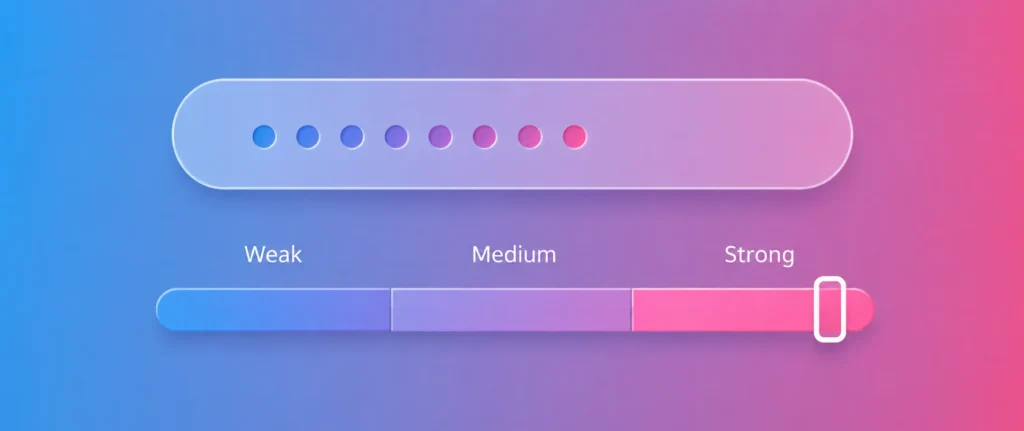
how to create a strong password for TwoCum
  • Use a minimum of 12 characters, mixing uppercase, lowercase, numbers, and symbols
  • Never reuse a password you use elsewhere
  • A password manager makes this easy without requiring memorization

Keeping Login Details Private

  • Never share your password with anyone, including people who claim to represent TwoCum support
  • Log out of your account after every session on any device that isn’t yours
  • If you think your login has been compromised, change your password immediately and contact support

Recognizing Phishing Attempts and Suspicious Messages

Phishing is one of the most common threats across all online platforms and adult platforms are a common target. Watch for:

  • Messages asking you to click an external link to “verify your account”
  • Requests for your password, payment details, or personal ID outside the official platform
  • Emails that mimic TwoCum’s branding but come from unofficial domains

If something feels off, don’t click. Go directly to TwoCum.com and log in from there. Legitimate platform communications will never ask for your password. Also check out our pricing page to know in advance all the standard procedures we follow for the payments.

Reporting Misconduct and Suspicious Behavior

TwoCum provides tools to report problematic users and behavior. Using them matters both for your own protection and for the well-being of the community.

Blocking or Reporting Other Users

blocking someone on TwoCum

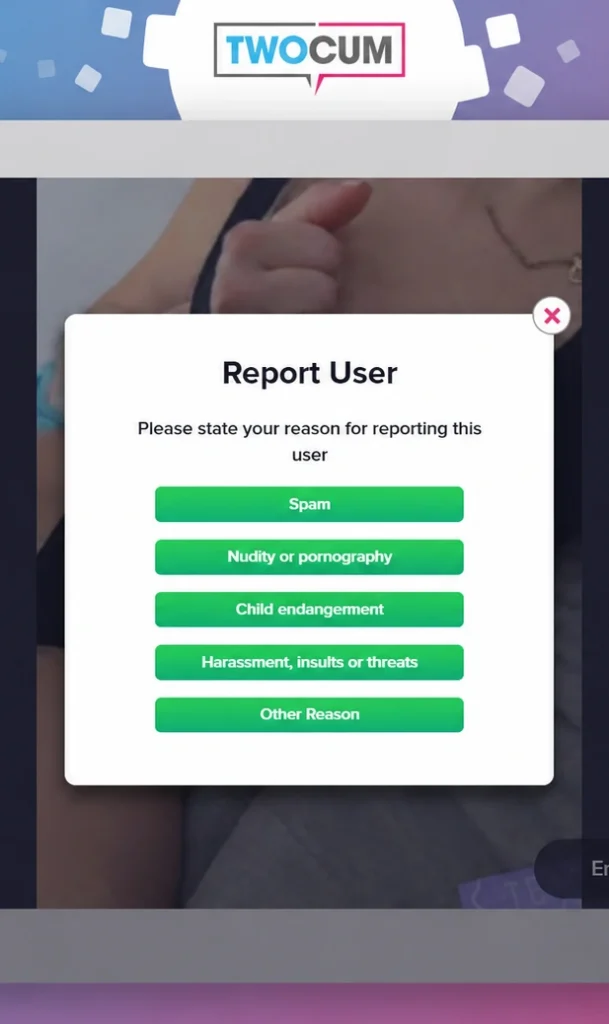
You can block or report any user directly from within the chat interface. Reasons for reporting include:

  • Harassment or threatening behavior
  • Minors suspected of accessing the platform
  • Sharing of non-consensual content
  • Scam attempts or requests for off-platform payments

When you submit a report, include as much context as possible. A clear, specific report is more actionable than a general complaint.

How Moderation Reviews Reports

Submitted reports are reviewed by the moderation team. The review process considers the nature of the violation, available evidence, and community guidelines. TwoCum’s moderation systems may help identify and act on suspicious activity, though specific outcomes and timelines vary depending on the nature of the report.

Safe Usage Tips for TwoCum

Good platform security is only part of the equation. Here are practical habits worth building:

  • Keep personal data out of chat. Avoid sharing your full name, phone number, home address, or any financial information with other users, regardless of how the conversation is going.
  • Be skeptical of external links. If someone sends you a URL, don’t click it unless you know exactly where it leads. Malicious links can be disguised.
  • Use trusted devices and networks. Avoid accessing TwoCum from shared or public computers. Use private, password-protected Wi-Fi or mobile data.
  • Log out when you’re done. On any shared or non-personal device, always log out completely when finished.

Final Thoughts About the TwoCum Safety and Security

Understanding TwoCum’s security practices can help you make more informed decisions while using the platform. The best approach is balanced: rely on moderation, account verification, and privacy tools, but also protect your own personal information and report any suspicious activity to ensure a hassle-free and seamless live cam experience.

Ready to dive in? Join TwoCum, verify your account, and start exploring with safety in mind.

woman lying in bed while on video call

DISCREET, SAFE, AND 100% LIVE.

Frequently Asked Questions

Yes. TwoCum is a registered adult platform with active moderation, mandatory age verification, and a user base of over one million registered members from more than 100 countries. It operates under defined terms of service and a privacy policy, and its infrastructure reflects a functioning, maintained service, not a fly-by-night operation.

No, TwoCum is a structured networking site built for adult communication, meaning it is not a scam. Like any major online service, it can occasionally attract malicious actors attempting to exploit others through deceptive messaging. The platform deploys active moderation tools to counter these behaviors, but users must remain vigilant against unsolicited external requests to ensure safety.

Yes, TwoCum collects and stores personal data as part of the registration and verification process. How this data is handled is outlined in the platform’s Privacy Policy, which governs data storage, use, and any applicable deletion rights. Users are encouraged to review the Privacy Policy for complete details.

Use a strong, unique password. Never share your login credentials. Log out on any device you don’t personally own. Be alert to phishing messages that request account information. If your account is ever compromised, change your password immediately and contact TwoCum support.

Anonymity is possible. Users are not required to use their real name publicly on the platform, and age verification is handled during registration rather than displayed on a public profile. However, TwoCum does collect identifying information as part of its verification process, and that data is stored according to the Privacy Policy.

Use the in-chat reporting tools to flag problematic users directly. Select the appropriate reason and include relevant context. This action flags the incident directly for TwoCum’s moderation tools and internal review teams.


Discover related articles

How to Log In to TwoCum

woman using her laptop to login on TwoCum

LOG IN FOR SECURE ACCESS TO LIVE SEX CAMS.

How to Login on TwoCum

Managing your account credentials efficiently is the first step to enjoying an uninterrupted user experience. This comprehensive guide outlines the exact steps for navigating the TwoCum login, finding the official entry page, and managing your user credentials securely. You will learn how to access your profile on various desktop and mobile browsers, register safely using the platform’s verification system, and perform troubleshooting steps when you cannot access your portal. Follow these practical instructions for straightforward, secure account access.

Steps to Sign In to Your TwoCum Account

Logging into your profile is a straightforward process when you use the official portal. This section provides the precise, step-by-step instructions needed to ensure a secure TwoCum login connection.

Finding the Official TwoCum Login Screen

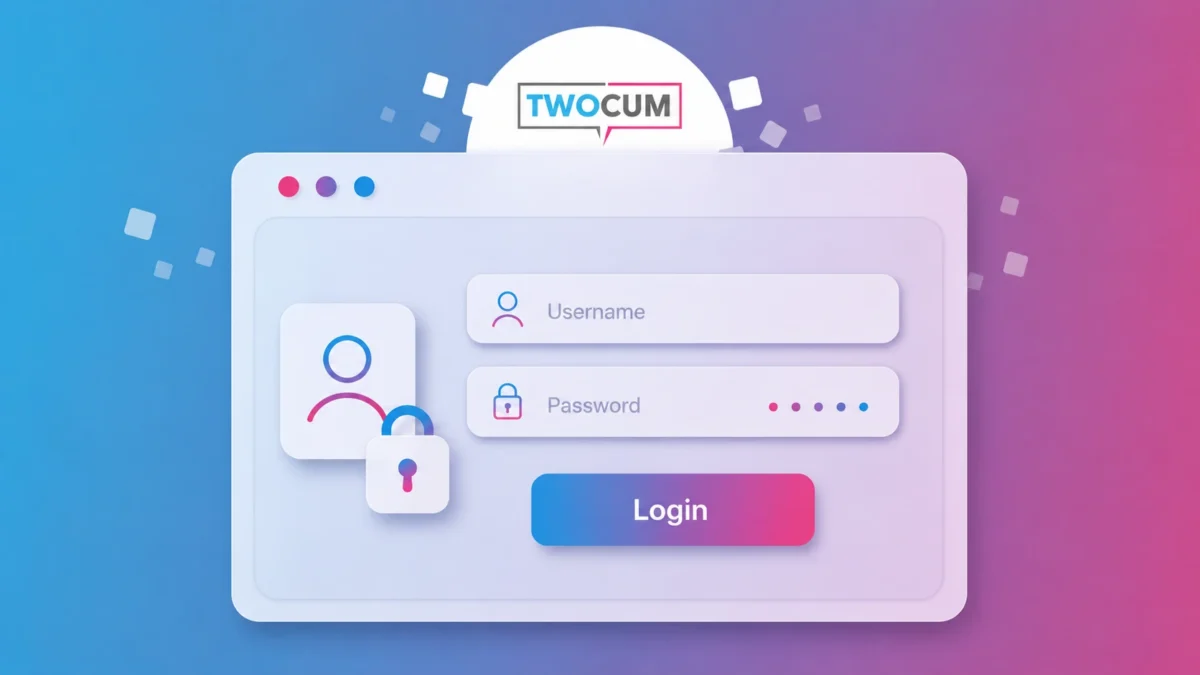
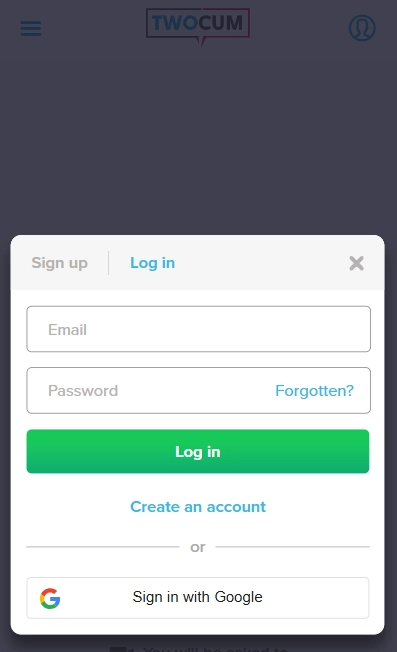
the login form on TwoCum

To guarantee data safety and secure account access and payments, always verify that you are on the legitimate web address. Avoid external promotional links, competitor references, or third-party redirection portals that mimic the platform’s interface. 

The primary destination is the official TwoCum login page. Bookmark this URL in your preferred web browser to bypass potential search engine clutter and protect your identity online.

Entering Your Login Credentials Correctly

Once you arrive at the login screen, enter your designated TwoCum account login data carefully. Accuracy is vital to prevent accidental system lockouts. Follow these numbered actions to sign in:

  1. Click the “Login” button located at the top-right corner of the interface.
  2. Input your registered email address or username into the first designated text field.
  3. Enter your unique, case-sensitive password carefully into the second field.
  4. Double-check that your caps lock key is disabled before submitting your user credentials.
  5. Click the final submission button to access your profile dashboard instantly.

Using TwoCum on Mobile and Desktop Browsers

The web interface is highly optimized to ensure reliable functionality across a broad spectrum of modern digital devices. No dedicated application downloads are required to interact with your dashboard. 

When using a desktop computer, standard browsers like Chrome, Firefox, or Safari provide full interface capability. For mobile devices, simply open your default mobile browser, load the main site, and execute the standard TwoCum login sequence to stay connected on the go.

Creating an Account Before Logging In

If you do not possess an active set of user credentials, you must complete the registration phase first. Joining this global network grants safe access to a verified ecosystem.

Registering for a New TwoCum Profile

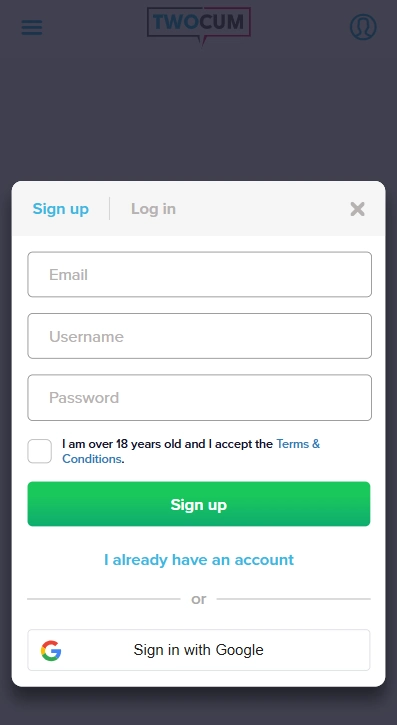
the sign up form on TwoCum

To create a new account, click on the official TwoCum sign-up link available on the homepage. As an established global platform serving more than 1 million registered users across more than 100 countries, TwoCum has clear rules in place for safe use of the platform.

During the registration phase, all individuals must pass a robust age verification system utilizing a valid government-issued ID. This mandatory compliance policy prevents underage access and ensures a safe, authentic environment for everyone.

Confirming Your Email Address After Registration

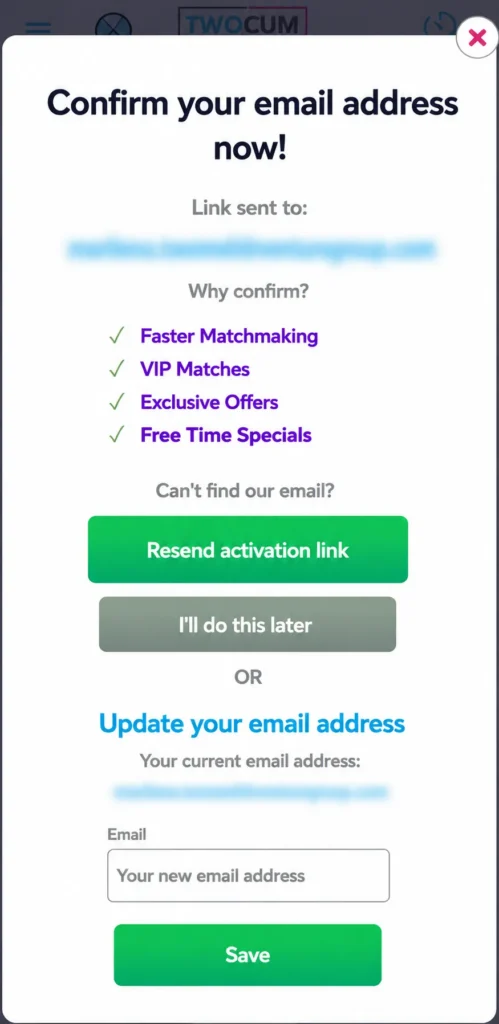
email confirmation step on TwoCum

After submitting your ID verification and registration forms, you will receive an automatic email confirmation link in your inbox. Open your email client, find the official account communication, and click the verification button to activate your profile. Completing this mandatory step certifies your account status and allows you to use your updated credentials on the primary login page.

Troubleshooting Common TwoCum Login Problems

Technical disruptions, corrupted local data, or forgotten passwords can occasionally block access to your online portal. Use the following dynamic troubleshooting techniques to solve common TwoCum login errors efficiently.

Error Symptom Potential Cause Recommended Fix
Forgotten Password Incorrect credentials entered Initiate a TwoCum password reset via email.
Locked Profile Too many failed sign-in attempts Wait 30 minutes for the safety cool-off period to clear.
Page Fails to Load Browser cache error or network conflict Clear browser history or open an incognito window.

Recovering Access After Forgetting Your Password

reset passwort form on TwoCum

If you forgot your password, do not attempt to guess it multiple times. An excessive number of incorrect entries will trigger an automatic security block on your account. Instead, navigate to the main sign-in portal and click the link labeled “Forgotten?” to begin an automated account recovery process. Input your primary email address to receive an encrypted link where you can safely establish new login parameters.

What to Do if Your Account Is Locked

Security parameters will automatically lock a user profile if multiple invalid attempts occur sequentially. If you can’t log in to TwoCum due to a security lock, be patient. The initial protocol is to wait 30 minutes for the automatic cooling-off period to clear. If you still face TwoCum login problems after this delay, contact the customer help center to complete an identity verification check.

Fixing a Login Page That Will Not Load

Sometimes the TwoCum login problems are caused by the browser or connection rather than the account itself. If the login screen keeps loading, refreshing, or showing an error, try these steps:

  • Refresh the page once.
  • Clear your browser cache and cookies.
  • Disable extensions that may block scripts.
  • Try another updated browser.
  • Switch from Wi-Fi to mobile data, or the other way around.
  • Restart your device if the issue continues.

If the page only fails on one browser, the problem is likely local to that browser. If it fails everywhere, wait and try again later or contact support.

Keeping Your TwoCum Login Secure

Preserving the integrity of your personal information requires strict digital hygiene. Maintaining rigorous control over your login endpoints prevents unauthorized third-party interference.

Tips for Protecting Account Credentials and Privacy

  • Create Complex Passwords: Always generate a complex password combining numbers, special characters, and alternating letter cases.
  • Avoid Public Saving: Never share your credentials with anyone, and refrain from saving your login data on shared or public workstations.
  • Review Safety Guidelines: Ensure that you regularly check the safety protocols listed on the platform’s official Safety & Security page.

Keep your software updated and use a password for your TwoCum account that you don’t use for other services. This helps reduce security risks and protects your TwoCum account from unauthorized access.

Ready to Access Your Account?

The TwoCum login process is simple once your account is registered, verified, and connected to an active email address. Most access issues can be resolved by checking your credentials, resetting your password, confirming your email, or fixing browser-related problems.

Sign in to your TwoCum account now, or create a new account if you have not registered yet.

Frequently Asked Questions

Most login failures occur due to simple typos in the user credentials or an unverified profile status. Ensure your caps lock key is disabled and that you have successfully finalized your mandatory ID age verification and email confirmation steps. If the issue remains, clearing your browser cache files can restore standard portal function.

Yes, an active profile is mandatory to explore the platform’s internal structure and core systems. Registration is completely streamlined and open to users worldwide across more than 100 countries, provided you fulfill the standard age verification.

To restore your account access, select the recovery link situated directly below the primary input fields on the login window. Enter the exact email address associated with your dashboard to receive an encrypted reset message.

Yes, the platform is engineered to function fluidly on all updated mobile browsers without downloading distinct software applications. Simply open your phone’s internet browser, navigate to the main web address, and use the standard sign-in interface to gain access.


Discover related articles